


Short Answer: Re-Process each invoice that contains the general ledger number.
Explanation: When you process an invoice, the general ledger accounts affected are pulled from the defaults in the tax resource, company setup, and/or the salesperson resource. You can process an invoice as many times as needed.
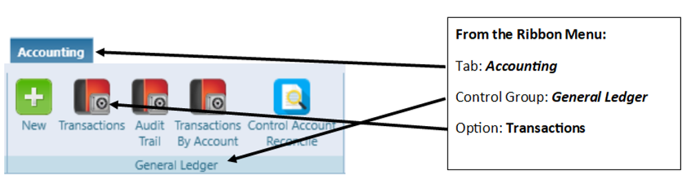
Therefore, once the general ledger account has been changed, you can go back in and process the invoice again and it will use the proper general ledger. To determine which invoices will need to be re-processed, run a list of general ledger transactions and sort (filter) by old general ledger number.
Explanation: When you process an invoice, the general ledger accounts affected are pulled from the defaults in the tax resource, company setup, and/or the salesperson resource. You can process an invoice as many times as needed.
Therefore, once the general ledger account has been changed, you can go back in and process the invoice again and it will use the proper general ledger. To determine which invoices will need to be re-processed, run a list of general ledger transactions and sort (filter) by old general ledger number.